Key takeaways
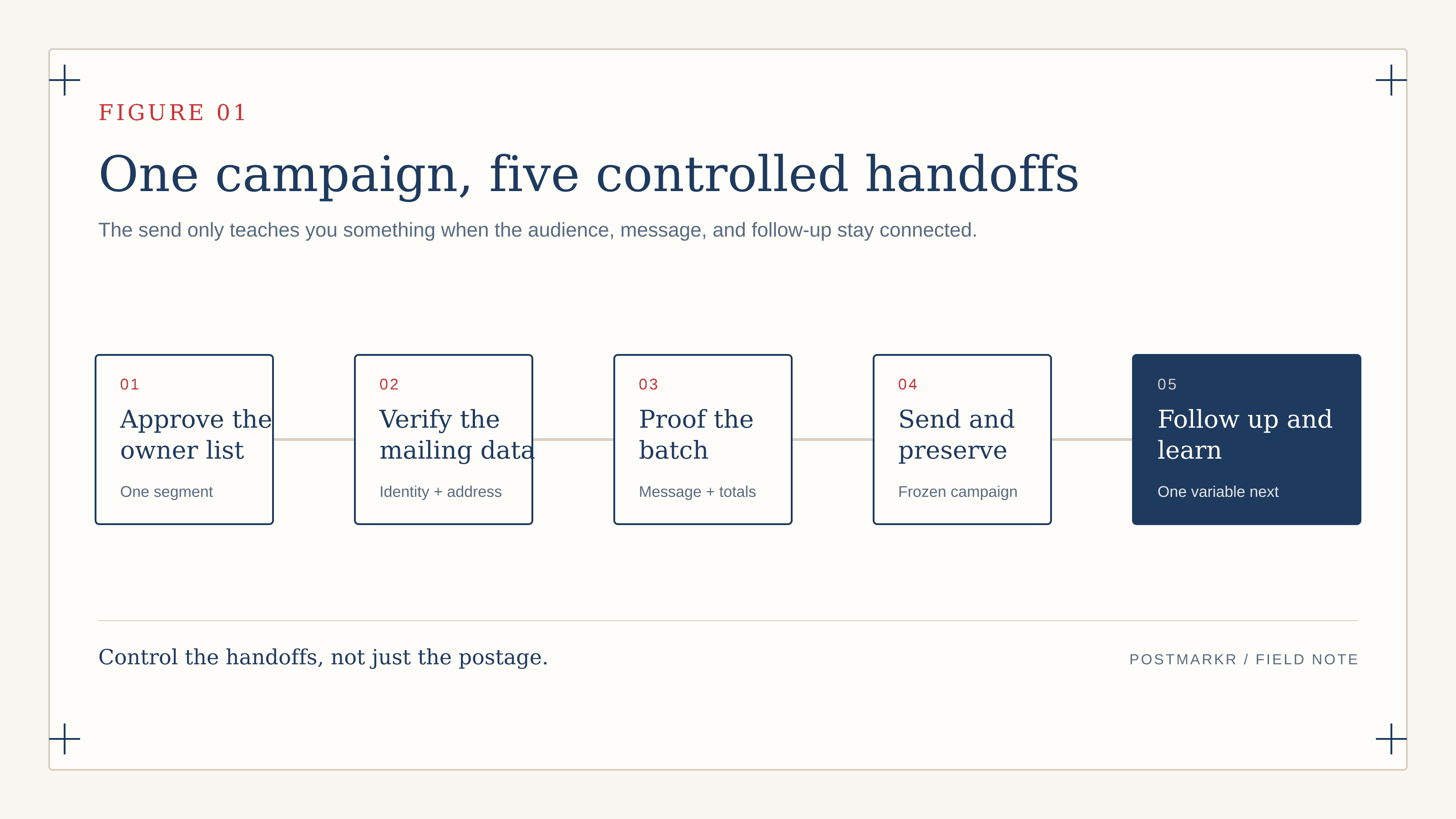
- Control one variable: run one owner segment against one approved message.
- Verify the owner separately from the mailing address.
- Sample the full file, not only the first proof.
- Preserve exactly what was approved and mailed.
You have an owner list and a letter you are ready to send. The risky part now is not the postage. It is mailing the wrong owner, merging the wrong company, or sending a batch nobody is ready to follow up.
Direct mail for search fund deal sourcing works as a controlled campaign, not a mail drop.
Stanford’s search-phase guide (opens in new tab) reports that personalized letters can produce higher hit rates than email but reach fewer companies. That tradeoff favors controlled batches and follow-up capacity over indiscriminate volume.
This guide starts after you choose physical mail. It takes you from an approved list and letter to a clean batch, a current proof, and a campaign record your CRM can use.
If you are still choosing a channel, start with our direct mail versus cold email comparison.
Build one campaign and a mail-ready owner file#
A campaign should test one owner segment with one approved message. Give it a name, ID, audience, message version, batch size, response owner, and system of record before you format the recipient file.
Do not change the list, message, and audience in the same wave. If results disappoint, you will not know whether the problem was targeting, the letter, production, or follow-up.
Batch size should follow your ability to verify owners, inspect the data, and respond. A smaller batch that receives timely follow-up is more useful than a large one that overwhelms the searcher.
Your research file and mailing file serve different jobs. Research can hold notes, estimates, source links, and possible contacts. The mailing file should contain only approved recipients and fields required to produce and track the wave.
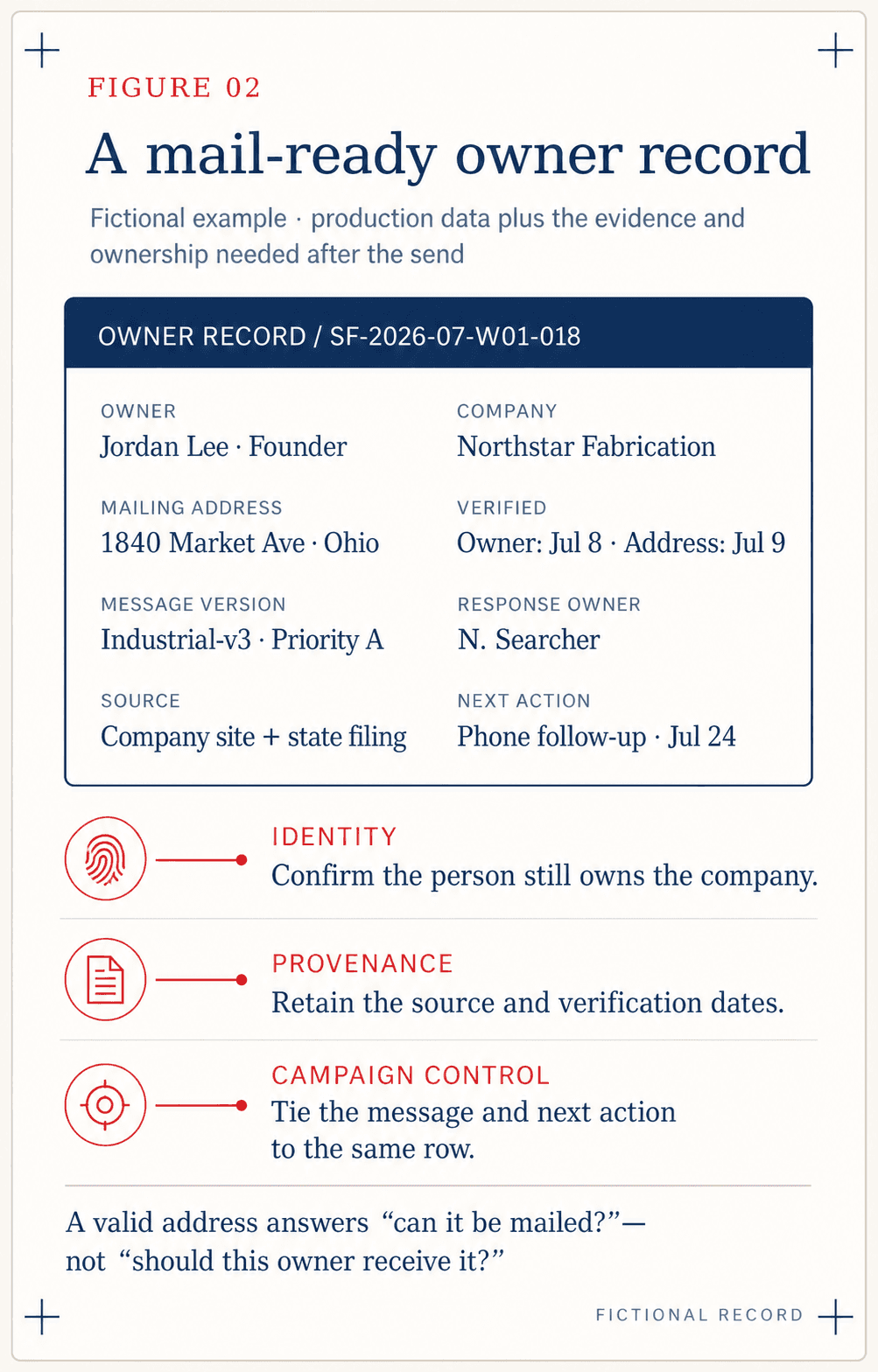
For each row, retain:
- Owner name, role, company, and a stable CRM or company ID.
- Postal address and the policy used to choose a business or home address.
- Owner source, address source, and recent verification dates.
- Campaign ID, priority tier, message version, and approved custom line.
- Response owner, next-action field, and any suppression reason.
Deduplicate at the owner, company, and normalized-address levels. Two contacts can represent one company. One owner can control several entities. Address matching can reveal duplicates that company-name matching misses.
Keep a suppression list for owners who asked not to be contacted, companies already in a live conversation, and records with unresolved identity questions.
Verify the owner separately
Postal validation can catch address problems. It cannot confirm that the person still owns the business, is the decision-maker, or belongs in your acquisition thesis.
If you still need to choose data sources or a CRM, use the search fund outreach tools guide. This process begins after those sources have been selected.
Choose how much to personalize#
The production method determines the data you need and the amount of quality assurance the campaign can support.
Method | Best fit | Required review |
|---|---|---|
Shared PDF | One approved letter works for the segment | Check the document once, then audit recipient and envelope data |
Mapped template | Recipient or company fields vary by row | Check every source field and the rendered merge behavior |
Manual top tier | Individual research or a wet signature justifies the effort | Review every letter outside the automated batch |
For a shared PDF, every recipient gets the same document. Do not include a personalized greeting or company claim unless it is true for every owner in the file.
For mapped copy, keep the field count small enough to verify. One accurate company line is stronger than several uncertain merge fields.
Postmarkr does not research the owner or write the custom line. It also does not reproduce a genuine wet-ink signature. If that treatment matters, reserve it for a small manual tier.
The question is not “How much can we personalize?” It is “How much accurate personalization can we prove before this wave goes out?” Use the 25-point owner-letter personalization checklist to verify the owner, reason, sender, response path, and follow-up record before the merge.
Use this seven-gate Postmarkr preflight#
Do not approve a batch because one proof looks right. A clean first record can hide a duplicate company, a blank field, or a stale address later in the file.
Pass these seven gates before checkout:
- Owner identity: each recipient has a source and a recent verification date.
- Duplicates and suppressions: each intended owner-company pair appears once, with exclusions applied.
- Postal data: required fields are present and the row counts reconcile.
- Personalization: every merge value is true, nonblank, and paired with the correct owner.
- Document and proof: the latest proof has the correct return address, pages, color, and layout.
- Quantity and cost: accepted recipients and the displayed total match the campaign brief.
- Follow-up readiness: each mailed owner has a campaign ID, response owner, and next action.
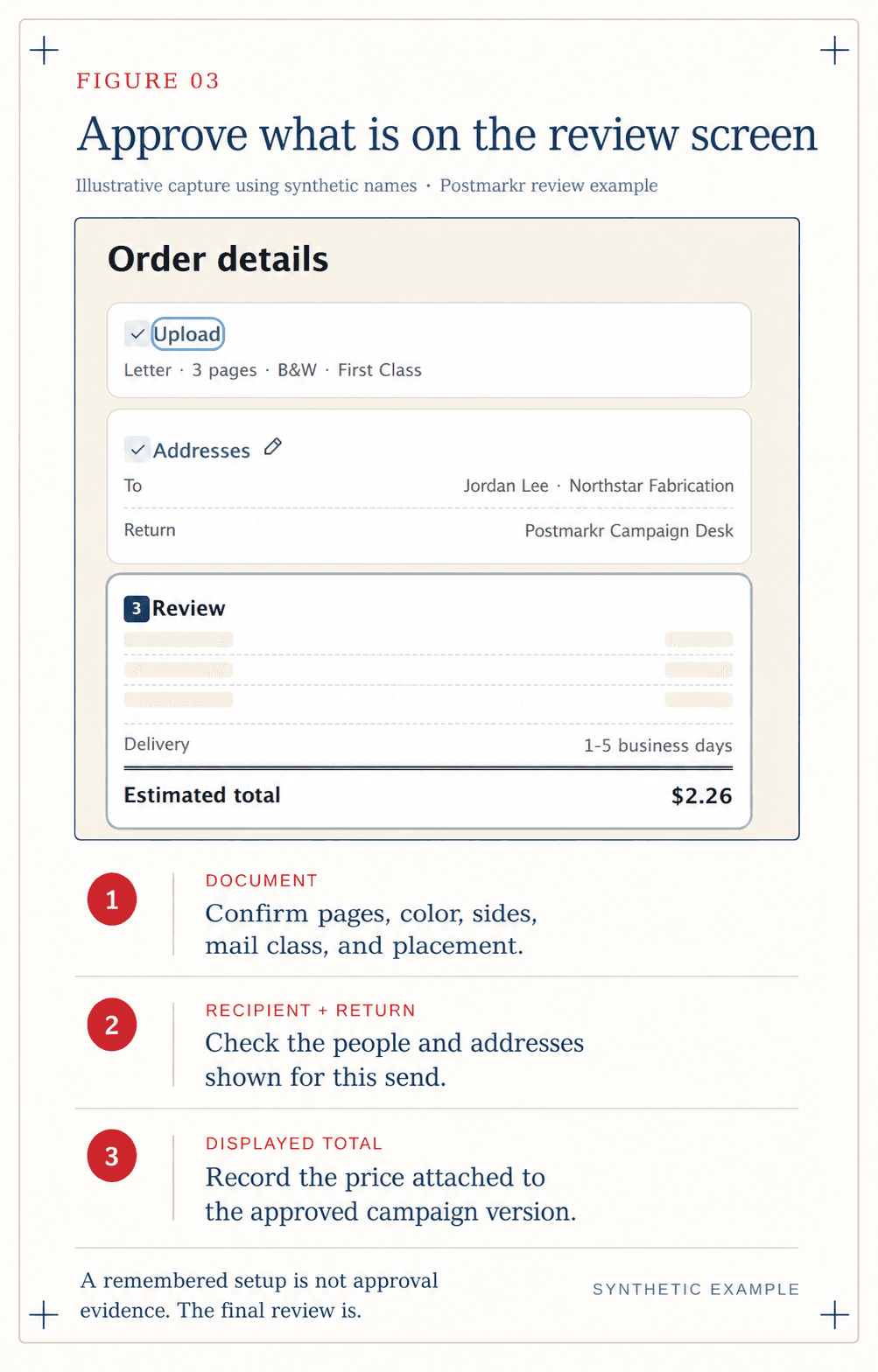
Stop if an owner-company pair is uncertain, a company appears twice, or a merge field is unresolved. Stop as well if the accepted count or total changes unexpectedly, the return address is wrong, or the proof predates the last edit.
For a personalized batch, use the proof to inspect layout and merge behavior. Use the source file to establish whether the values for every recipient are accurate.
Sample beyond the first row
Review every high-priority row. For the rest, inspect the beginning, middle, and end, plus any unusual name, company, custom line, or address.
Save the completed preflight. When an owner calls three weeks later, you should know which letter they received, which list produced it, and who owns the next step.
Send, preserve, and hand off the campaign#
The uploaded file is an input. The campaign record should describe what you actually approved and sent.
Preserve these details together:
- Campaign ID, thesis, owner segment, and message version.
- Source-file location and the date the owner data was verified.
- Intended, accepted, invalid, duplicate, and excluded recipient counts.
- Document or template version, proof recipient, and return address.
- Displayed checkout total, send date, and order or batch identifier.
- Response owner, CRM destination, and follow-up-ready date.
Use the displayed checkout total instead of rebuilding the price in a spreadsheet. Page count, color, recipient count, and other production choices can change the final amount.
Do not overwrite the source file after sending. Freeze a copy with the campaign record. Your working list can change; the mailed version must remain reconstructable.
Turn the send into a follow-up queue#
The operating sequence is simple:
From send to qualified conversation
Send date — Preserve the approved wave
Store the mailed population, message version, and campaign ID.
Follow-up window — Make the row actionable
Open the planned channel and assign the next action.
Owner response — Route the conversation
Stop the generic sequence and record the reply.
Qualified conversation — Move into deal qualification
Carry forward the owner, notes, and next action.
Status is not attention
Use available mail status as operational context. Track accepted pieces, failures, carrier events when available, owner replies, qualified conversations, and next actions.
The follow-up channel and timing belong to the outreach plan. The direct mail versus cold email guide covers that choice; this handoff ensures the plan can actually run.
Improve the next wave from the closest signal#
Do not rewrite the letter every time a wave is quiet. Begin with the closest thing you can observe:
- Many invalid or returned pieces: check source quality, verification dates, and the address policy.
- Valid mail with no replies: inspect targeting, message, timing, and whether follow-up happened.
- Mostly irrelevant replies: revisit the acquisition thesis and list filters.
- Owners mention the letter but do not engage: inspect credibility, the ask, and the ease of the next step.
- Conversations start but stall: inspect qualification, seller timing, expectations, and follow-through.
These are diagnostic hypotheses, not automatic conclusions. A quiet wave does not prove that direct mail failed. It tells you what to investigate before spending on another batch.
Change one important variable at a time. If you replace the list, letter, format, and cadence together, the next wave may improve without teaching you why.
Keep the searcher and production roles clear#
You own the decisions that require acquisition judgment:
- Thesis, target criteria, correct owner identity, and list inclusion.
- Message, custom fields, factual accuracy, and any genuine signature.
- Follow-up, seller qualification, relationship history, and the deal.
Postmarkr handles the production workflow:
- Recipient-data validation and duplicate handling within the mailing flow.
- A true proof of one personalized letter, printing, postage, and grouped checkout.
- Batch and piece status after payment, including USPS scan updates when available.
Postmarkr cannot turn weak targeting into seller intent. It can remove the printing, addressing, postage, and status administration—and put proofing into one clear review step.
When the list, letter, and follow-up owner are ready, prepare the owner-letter campaign.
Review the current workflow on How It Works and confirm the displayed options on pricing before sending.