Key takeaways
- A useful search fund outreach stack gives company data, outreach, CRM, and deal flow separate owners.
- The CRM is the system of record for every touch, reply, owner, status, and next action.
- Start with the leanest option that completes each job; upgrade when a real handoff or coverage gap appears.
- Public pricing shows where commercial terms start, not the full cost of data, labor, setup, usage, or transaction fees.
- Physical mail is an execution channel. It does not replace company research, email infrastructure, CRM, or deal flow.
You do not need the most complete search fund outreach stack. You need one clear owner for four jobs: finding companies, contacting owners, tracking relationships, and evaluating deal flow.
Useful search fund outreach tools make those handoffs visible. They do not collapse the jobs into one vendor.
A database does not manage follow-up. A CRM does not find every owner. An email sequencer does not become deal flow because it sends more messages.
Start with the leanest option that can complete each job. Upgrade when a real constraint appears: weak coverage, missed follow-ups, unclear ownership, or reporting work your current setup cannot handle.
The right stack also depends on how you search. A self-funded searcher may trade coverage for cost. A funded team may pay for deeper data or analyst support. Both still need the same handoffs.
This guide compares those handoffs, not vendor popularity. It treats search fund outreach tools as a workflow, not a shopping list.
How we evaluated the tools#
How this guide was checked
Product and pricing details were checked on official vendor pages on July 16, 2026. Quote required means the vendor did not publish a dollar price. Public pricing does not equal total cost.
Postmarkr publishes this guide and sells online letter sending. This article uses no affiliate links. That relationship matters when you weigh the physical-mail recommendation.
Official pages establish what each vendor sells. The Stanford 2026 Search Fund Study (opens in new tab) provides context, not tool-popularity data.
Practitioner discussions helped identify workflow questions. They do not support claims that one tool is the most popular, the default, or better for every searcher.
The four jobs in a search fund outreach stack#
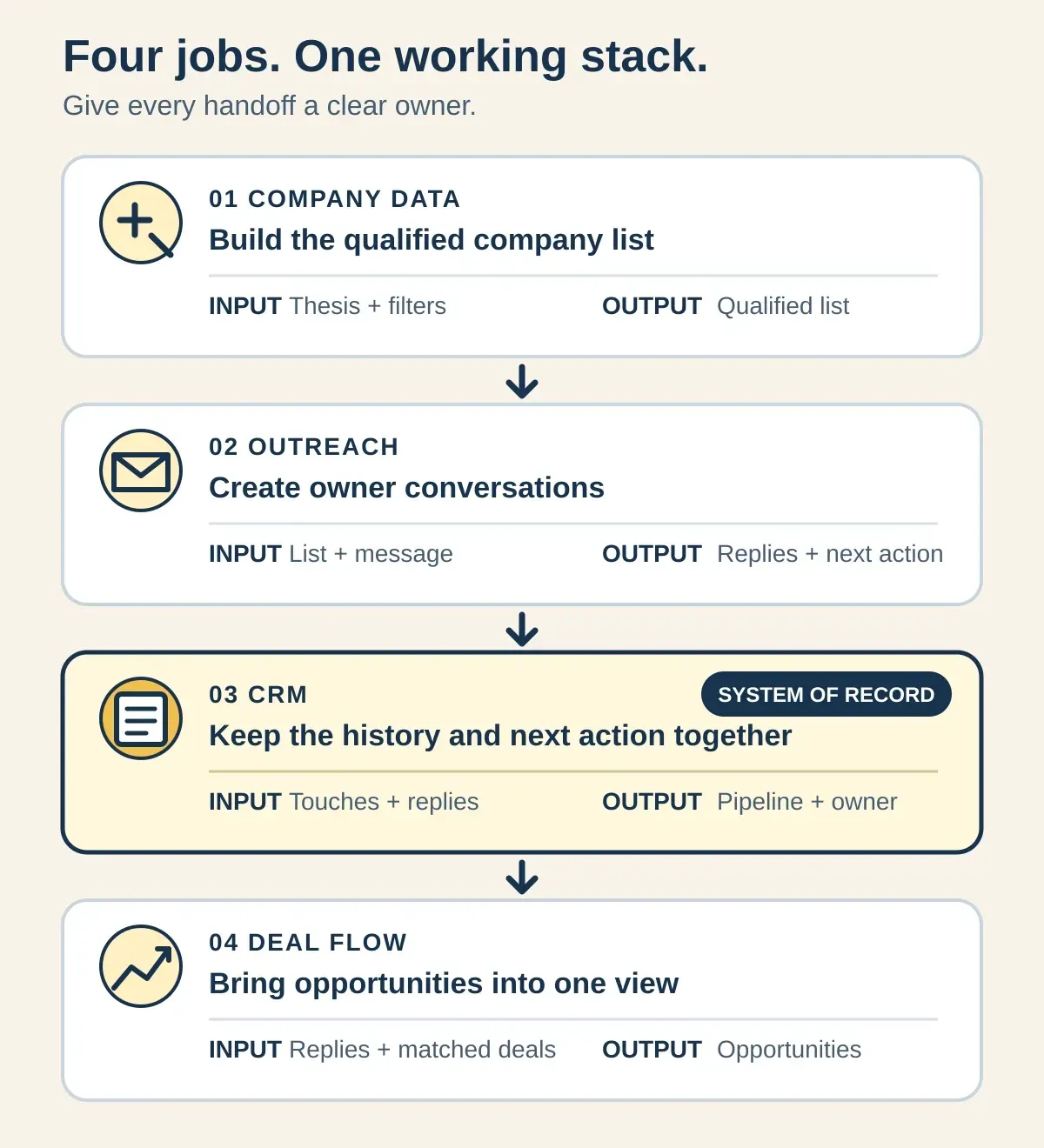
The stack works when each layer accepts a clear input and produces something the next layer can use. A handoff without an owner becomes a spreadsheet no one trusts.
- Company data: turns your thesis and filters into a qualified company list.
- Outreach: turns a qualified list and message into attempted contacts and replies.
- CRM: turns every touch and reply into an owner, status, and next action.
- Deal flow: turns broker, marketplace, and referral inputs into opportunities to evaluate.
The CRM is the system of record. It does not need to be the most expensive tool. It needs to answer who owns the relationship, what happened, and what happens next.
Do not add a vendor because it fits the category. Add it when it owns a job or repairs a broken handoff.
What changes between traditional and self-funded search?#
Both models need the same jobs. The difference is how much cash, team capacity, and manual work you can assign to each one.
These are planning defaults, not rules for every search. Start from your constraints, then change the default when the work gives you evidence.
Funding changes where you spend—not the four jobs the stack must complete
Decision lens Compare | Self-funded default Protect cash | Traditional funded default Buy leverage |
|---|---|---|
Cash | LeanProtect cash while the thesis is still moving | LeverageSpend where deeper coverage or support removes repeatable work |
Team capacity | ManualKeep fewer tools and accept visible manual work | OwnedAssign clear owners across data, outreach, and pipeline operations |
Data depth | TestTest filters with a lean data source before buying more coverage | CompareCompare premium data against a defined coverage gap |
Outsourcing | NarrowKeep judgment close; outsource a narrow repeatable task only when needed | DefinedUse analyst support when the handoff, review standard, and CRM write-back are explicit |
Upgrade timing | EvidenceUpgrade after a missed handoff or proven coverage gap | CapacityUpgrade when recurring work limits throughput or reporting quality |
Source: Postmarkr analysis. These are planning defaults, not universal rules; apply them to your thesis, budget, and team.
Funding is not a reason to buy every category. A larger budget can hide duplicate data, overlapping sequencers, and a CRM that still lacks one accountable owner.
A lean budget is not a reason to run the search from disconnected files. Manual work is manageable only when the status and next action remain visible.
Choose search fund outreach tools by the job and upgrade trigger#
A tool earns its place when it owns a job or fixes a broken handoff. Time on a free tier is not an upgrade trigger. Missed work is.
Use this table as a shortlist, not a universal stack. Public pricing status tells you whether a vendor exposes the starting economics. It does not include data cleanup, labor, setup, usage, or transaction terms.
Add a tool only when a specific handoff breaks
Job Own the job | Lean starting point Start here | Upgrade when Trigger | Public pricing status | Important limit Guardrail |
|---|---|---|---|---|
Build a qualified company list | TestApollo's free offer or local-library access to Data Axle Reference Solutions | Your thesis is stable, but filters, company coverage, or contact data leave material gaps | MixedApollo publishes prices; Grata and SourceScrub require a quote | More data does not fix a vague thesis |
Run cold-email outreach | SendSmartlead Base or Instantly Outreach Growth | You need more sending capacity, inbox management, or deliverability controls than the current plan supports | PublicBoth publish monthly prices | Sending volume does not replace list fit or a relevant message |
Keep the system of record | SystemHubSpot Free or Airtable Free | Follow-ups are missed, ownership is unclear, or manual reporting obscures the pipeline | PublicHubSpot and Airtable publish limits and paid tiers | A flexible table still needs a defined process |
Add relationship intelligence | OptionalStreak for a Gmail-centered workflow; Affinity for automatic activity and relationship signals | Manual logging hides who knows whom or which owner needs the next action | PublicBoth publish per-user prices | Automation cannot decide whether a relationship matters |
Review brokered and marketplace flow | ReviewAxial, Kumo, or public business-for-sale marketplaces | You need a repeatable place to review opportunities outside proprietary outreach | VariesAxial and Kumo publish commercial terms; marketplace terms vary | Brokered flow is not a substitute for proprietary sourcing |
Add a physical letter touch | SelectedPostmarkr for selected owners or accounts | A high-priority segment warrants a physical touch alongside the digital reply path | PublicCurrent per-piece pricing is public | Postmarkr executes letters; it does not replace data, email, CRM, or deal flow |
Source: Postmarkr analysis based on official vendor pricing and product pages, checked Jul. 16, 2026. See the dated source list below.
Name the system of record before adding channels. Every reply, call, letter, broker introduction, and next action should return to one place.
Avoid paying twice for the same job. If a data platform's basic sequences are enough for thesis testing, a separate sequencer may add complexity before it adds value.
The opposite can also be true. A specialist outreach tool may earn its place when inbox operations become the constraint. That is an upgrade based on work, not a ranking or a calendar date.
Build a lean stack for the stage you are in#
There is no honest universal monthly total. Data, seats, sending, mail, analyst time, and transaction terms move independently. Budget the jobs separately so one cheap tier does not hide the full operating cost.
Thesis testing#
Start with Apollo's free offer or check whether your local library provides Data Axle Reference Solutions. Use HubSpot or Airtable as the system of record.
Review Axial, Kumo, and public business-for-sale marketplaces in a separate deal-flow lane. Do not mix a brokered listing with the status of a company you found through proprietary research.
Add a dedicated sequencer when manual sending or inbox work becomes the constraint. Before that point, another tool may create more setup than useful signal.
Repeatable proprietary outreach#
Choose paid data from the gaps you can name: missing companies, weak contact coverage, or research work that slows the team. A quote is useful only when it answers that gap.
Use one sequencer, one CRM, and one owner for the reply path. Add a selected physical-mail segment when it has a reason to exist, then log the touch with every other channel.
For the campaign sequence around these tools, use the search-fund deal sourcing guide.
Funded or higher-volume search#
Premium data, relationship intelligence, or an analyst-supported service can earn a place when the team has a defined review standard and the results write back to the CRM.
Search Fund Plus belongs in this category as a managed execution service, not as a simple database or deal tracker. Its pricing requires a quote.
Do not outsource the judgment that defines a qualified company or a promising reply. Outsource repeatable work only after the input, output, and quality check are clear.
Return every channel to the CRM#
More channels create value only when their signals return to one record. Use the same handoff whether the touch starts with email, a letter, a call, a broker, or a referral.
From list to qualified conversation
List approved — Create the CRM record
Store the source, thesis fit, owner, company, campaign, and next action.
Contact attempted — Log the channel and message
Keep email, letter, call, or referral activity on the same company and owner record.
Reply received — Capture the response
Move the response out of private inboxes and note what the owner actually said.
Follow-up assigned — Name the next-action owner
Give the next action a status and accountable person.
Qualified — Advance the opportunity
Move the conversation into deal review without losing its sourcing history.
The tool can automate a write-back. It cannot decide whether the record is useful. Define the fields and ownership before you automate the handoff.
Where physical mail fits—and where it does not#
Physical mail is an execution channel. It is not another database, sequencer, CRM, or deal platform.
Use it for a selected owner or segment when a tangible touch supports the outreach plan. Do not mail an unqualified list to compensate for weak data or an unclear thesis. Use the owner-letter personalization checklist to turn verified company research into a credible reason for writing.
Postmarkr handles the letter send. A one-page black-and-white letter totals $2.05, including processing. There is no subscription or minimum.
New Postmarkr sends start as letters during beta. A batch shares a PDF or compatible letter template across recipients. Template-based mail merge can personalize compatible letters.
You still need company research, channel strategy, and a CRM reply path. Send a letter online only after you know who should receive it and where the response will go.
If you are deciding whether mail belongs in the mix at all, compare direct mail with cold email for search fund sourcing.
See current pricing before a campaign. Vendor pages and product limits can change after this guide's checked date.
Methodology and dated sources#
We checked the following official pages on July 16, 2026. Recheck a vendor's live page before buying, because pricing, plan limits, and commercial terms can change.
- Context: Stanford 2026 Search Fund Study (opens in new tab).
- Company data: Apollo (opens in new tab), Data Axle (opens in new tab), Grata (opens in new tab), and SourceScrub (opens in new tab).
- Outreach: Instantly (opens in new tab) and Smartlead (opens in new tab).
- CRM: HubSpot (opens in new tab), Airtable (opens in new tab), Streak (opens in new tab), and Affinity (opens in new tab).
- Deal flow: Axial (opens in new tab), Kumo (opens in new tab), BizBuySell (opens in new tab), and Search Fund Plus (opens in new tab).
- Physical mail: Postmarkr pricing, how it works, and the current product workflow.
- Workflow questions: SearchFunder (opens in new tab) and Pacific Lake (opens in new tab).
The simplest useful stack is the one that completes every handoff without hiding ownership. Add another tool only when the evidence says a current job or handoff is failing.