Claude can't mail a letter on its own. With the Postmarkr connector, it can get one ready for you. Give Claude your letter, or attach a PDF, along with the recipient's address and your return address. Claude saves it as an unpaid draft in your Postmarkr account and gives you a link. You open the link, check the printed proof and the price, and pay. Postmarkr then prints the letter and mails it by USPS First-Class. A one-page black-and-white letter costs $2.05, postage included.
You need a Postmarkr account (you can create one while connecting), the recipient's US mailing address, and your return address.
Connect Postmarkr to Claude#
You do this once.
- Open Postmarkr in Claude's connector directory (opens in new tab). You can also find it in Claude under Customize → Connectors, then +.
- Choose Connect. Sign in to Postmarkr, check that the account shown is the one you want, and confirm.
- In a chat, click + in the message box, hover over Connectors, and make sure Postmarkr is switched on.

Directory connectors are available on every Claude plan. On a Team or Enterprise plan, an owner has to enable Postmarkr for the organization before you can connect it.
Mail a letter from text#
Paste or write the letter in the chat, then ask Claude to mail it. Include both addresses:
Use Postmarkr to mail this letter for me. Recipient: [name, street, city, state, ZIP]. My return address: [name, street, city, state, ZIP]. [Your letter]
If a detail is missing, such as an apartment number, Claude should ask you for it. Postmarkr tells Claude to ask rather than guess.
Claude then saves the letter as an unpaid draft and replies with a review link and an estimated price.

The estimate is a guide. The total shown in Postmarkr before you pay is the price you're charged.
Mail a PDF you already have#
Attach the PDF to your message and ask Claude to mail it as it is:
Mail this PDF as it is with Postmarkr. Recipient: [address]. Return address: [address].
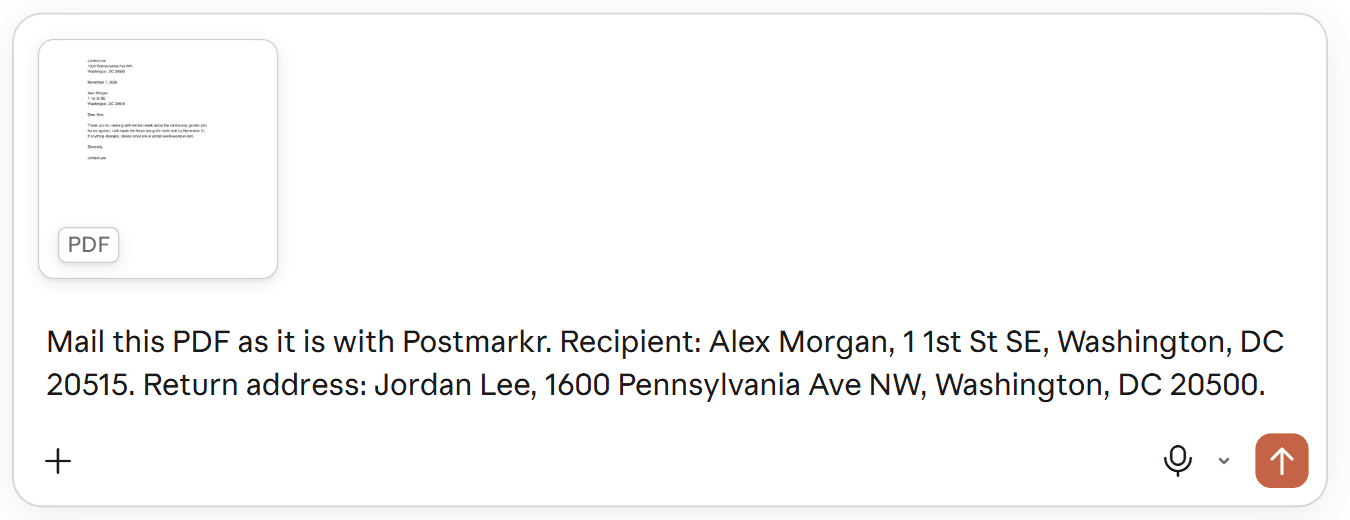
Claude sends your original file to Postmarkr unchanged, so your letterhead, layout and signature print as they are. Claude can send files up to 4 MB. In our test, Claude confirmed the upload and gave us the review link.
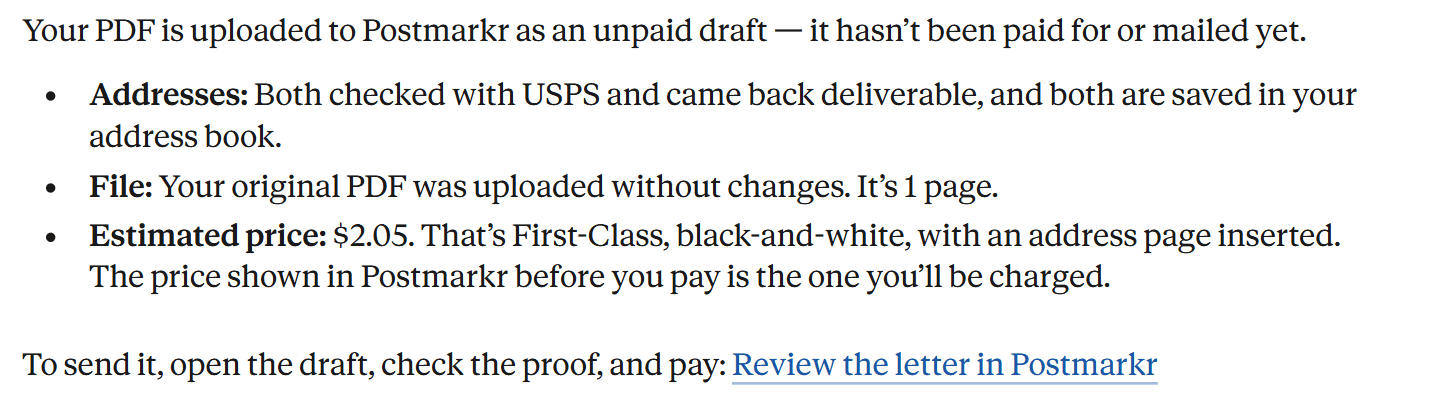
Claude sends the file using its code-execution feature. If that feature is off, or your organization limits Claude's network access (Enterprise plans do by default), Claude can't send the file. The same goes for a file over 4 MB. Claude then tells you the file wasn't sent and gives you a link. Open the link and upload the PDF yourself in Postmarkr; your addresses are already saved.
Claude only retypes a PDF into a new letter if you ask it to.
Review and pay in Postmarkr#
Open the link Claude gives you, signed in to the same Postmarkr account you connected. Check:
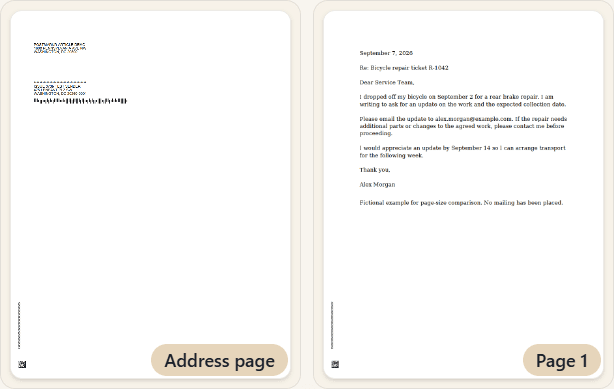
- The proof. Postmarkr adds an address page in front of your letter, so a one-page letter shows two pages.
- Both addresses. Postmarkr finishes its address check here. Fix any warning before you continue.
- The total. This is the amount you pay.
When everything looks right, pay in Postmarkr. Claude can't pay for you, and connecting it gives it no spending authority. A saved draft isn't paid or mailed until you complete checkout, and a paid letter still has to be printed and handed to USPS. You can follow its status in Postmarkr, or ask Claude.
Check on a letter later#
In the same chat, ask:
Check the status of my Postmarkr letter.
In a new chat, give Claude the letter ID. It's the code after "draft=" in your review link:
Check the status of my Postmarkr letter with ID [letter ID].
Claude can look up a letter you name in your connected account. It can't search your mail history, read back a letter's contents or cancel a letter.
What the connector doesn't do#
- It prepares one letter at a time to a US address, sent USPS First-Class. To mail a list of recipients, use Postmarkr in your browser.
- Certified Mail and international destinations aren't available from Postmarkr.
- It never pays or mails anything by itself.
Preparing a letter may also save both addresses to your Postmarkr address book and create a template you can see in your account.
If something goes wrong#
- Claude doesn't use Postmarkr. Click +, then Connectors, and switch Postmarkr on for the chat.
- Wrong Postmarkr account. In Postmarkr, open Settings → Connected apps and disconnect Claude, then connect again and confirm the right account.
- You changed the letter after Claude saved it. Ask Claude for a new draft and review that one before paying. Editing the chat doesn't change a saved draft.
Using ChatGPT instead? See how to send a letter from ChatGPT. For connection details, see the Postmarkr assistant setup guide.
Sources and testing notes#
We tested both routes on November 7, 2026, in Claude on the web on an individual Ultra plan, using a fictional letter, fictional names and public-building addresses. Each test saved one unpaid draft. Nothing was paid for or mailed. The review-screen image is from our September 8, 2026 test of the browser upload. Plan and settings details come from Claude's help center.