Start with a US Letter PDF#
Your letter is finished in ChatGPT. To mail it through Postmarkr, download it as a US Letter PDF—8.5 × 11 inches—then upload the file, enter the mailing addresses, and review the print preview and price before paying.
Check the paper size even if the download ends in .pdf. A4 is a different size, and a document that looks like an ordinary letter on screen can still need adjusting before it can be mailed.
Already have a PDF? Check its page size, or go straight to fixing an A4 file if you already know that is the problem. If you have checked that it is US Letter, skip to uploading and checking the mailing.
Already have your ChatGPT PDF downloaded? Upload it and Postmarkr prints and mails it USPS First-Class from $2.05.
This guide follows the file from the ChatGPT conversation to Postmarkr's final review. You will need the approved letter text, the recipient's mailing address, your return address, and a Postmarkr account for the mailing steps.
Using a browser assistant#
Have a finished PDF and an assistant that can use a browser? You can try asking it to help prepare a letter on Postmarkr's website. We have not tested ChatGPT dots or Meta Muse on Postmarkr. These instructions describe a workflow to try with your supervision.
Follow OpenAI's browser and sign-in instructions (opens in new tab) or Meta's Muse guidance (opens in new tab) first. Your assistant may have its own browser session. Take over to sign in privately when prompted, then return control. Make the approved PDF available to that browser's file picker; a file in another chat or on your device may not be accessible there. If your assistant cannot upload the PDF, take over and upload it yourself, then return control. OpenAI says its built-in desktop browser (opens in new tab) cannot automate file uploads; other browser environments may differ.
Give the assistant the recipient address, return address and print preferences. Keep passwords and payment details out of the prompt. If you still need the PDF, use the download steps below.
Help prepare my PDF letter at https://postmarkr.com/app/send/new. Preserve its wording. Use only the recipient address, return address and print preferences I provide; ask about anything missing. Let me take over for sign-in and any upload you cannot complete. Show me the current print preview, both addresses, print settings and total. Stop before “Continue to payment” so I can review and complete checkout myself. If you cannot inspect the preview, stop and let me review it. After any interruption, check the existing draft or order. If you cannot confirm whether an order or payment already exists, stop and let me take over. Do not create another mailing or retry payment.
Review the actual preview and total yourself, then complete checkout yourself. If the file, addresses or print settings change, check the updated result. If the assistant gets stuck, take over in its browser and check what has been saved before continuing. If the order or payment status is unclear, stop rather than starting another mailing or paying again.
After payment, check the order in Postmarkr. A successful payment does not mean the letter has mailed or arrived.
Step 1: Download the letter from ChatGPT#
In the conversation containing your finished letter, ask for a downloadable file. Be explicit about both the format and the paper size:
Create a downloadable PDF of the approved letter above. Use US Letter paper, 8.5 × 11 inches, portrait, on every page. Use 1-inch margins and readable 12-point text. Preserve the wording, names, dates and amounts exactly. Include only the letter, without chat commentary, Markdown markers or an extra cover page. Keep text selectable. Do not shrink the text or omit content to force one page. Name the file letter-us-letter.pdf.
Those margins and text size are a practical starting point. The prompt still needs a check: open the resulting file to see whether it follows your instructions.
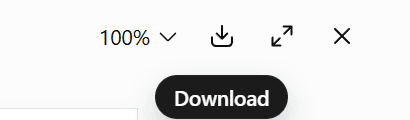
When ChatGPT returns the file, click its filename to open the preview. In the preview, choose Download—the downward arrow near the top right—to save it to your device. Opening the preview alone does not save a local copy. If it gives you another text response, ask, “Please provide the letter as a downloadable PDF file.” If file creation is unavailable in your session, use the Google Docs steps below.
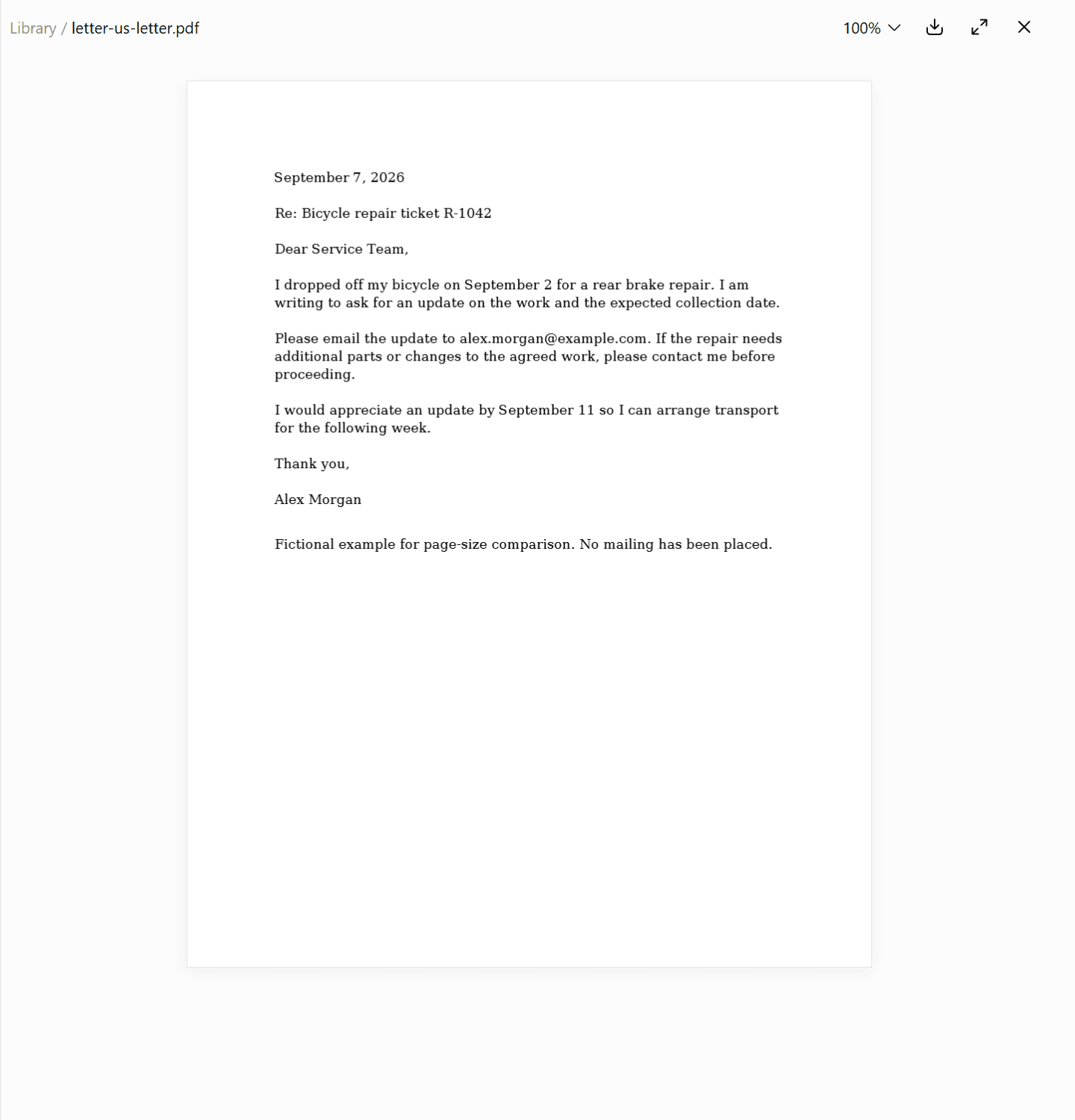
We tried this with the fictional bicycle-repair letter (opens in new tab). ChatGPT produced this downloadable PDF (opens in new tab): one US Letter page with selectable text. We checked the saved file’s dimensions and compared its wording with the source; the text matched. This is one tested export, so check your own file too.
In our signed-out attempt, ChatGPT instead prompted us to log in to create and download files. If you see that message, sign in or use the document-editor fallback below.
Which download should you choose?#
The file choices depend on the ChatGPT feature you are using. Use the extension to identify what you have:
What you have | Next step |
|---|---|
PDF (.pdf) | Open it and check the page size. A PDF can still be A4. |
Markdown (.md) | Convert the text to a US Letter PDF. Markdown has no fixed paper size; renaming it |
Word (.docx) | Set Letter paper in Word and export a PDF, or copy the letter text into Google Docs. Check the exported copy. |
Copied reply | Paste just the letter into a document editor and export a PDF. |
Shared-chat link | Download or create the letter PDF. The link itself is not a file you can upload. |
Postmarkr's letter upload accepts PDF files. Keep a Markdown or Word version if you want an editable source, but use the final PDF for mailing.
If you need to export through Google Docs#
On a computer, paste the approved letter into a new Google Doc. Open File → Page setup → Pages, choose Letter paper and portrait orientation, and set the margins. Apply the settings to the whole document. Google documents these controls in its page setup instructions (opens in new tab).
Then choose File → Download → PDF Document (.pdf). Open that downloaded copy before you upload it. Google's download instructions (opens in new tab) explain where to choose the file type.
If you only have Markdown, use the rendered letter text or ask ChatGPT for a clean plain-text version before pasting. Check for literal # headings, ** markers, or code fences that do not belong in the letter.
Find the saved copy#
Use your browser's downloads list to open the file you just saved. Check its filename so you can select the same file in Postmarkr. If you are doing this on a phone, use the phone mailing guide for saving and finding the PDF.
Lost the attachment in a long chat? On ChatGPT's website, try Library in the sidebar, select the saved file, and choose Download. OpenAI's Library instructions (opens in new tab)
Step 2: Check whether the PDF is A4 or US Letter#
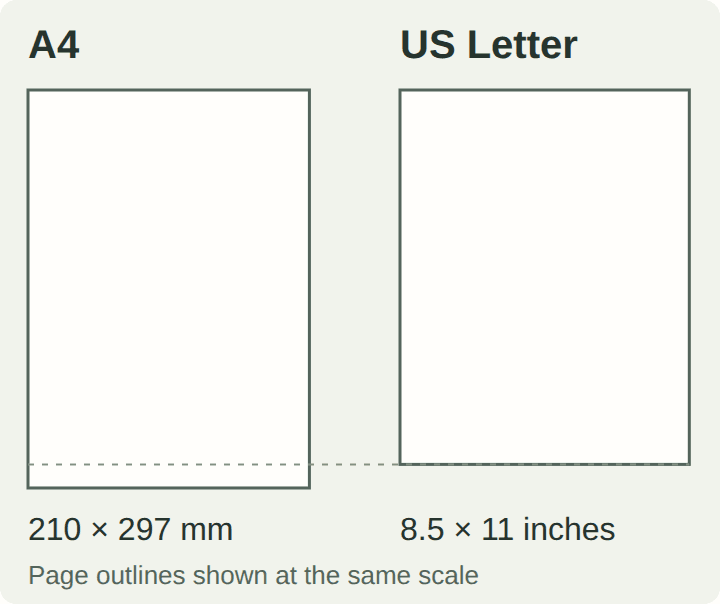
US Letter is 8.5 × 11 inches. A4 is 210 × 297 mm, approximately 8.27 × 11.69 inches. A4 is narrower and taller. Both can look similar when a viewer scales the page to fit your screen.
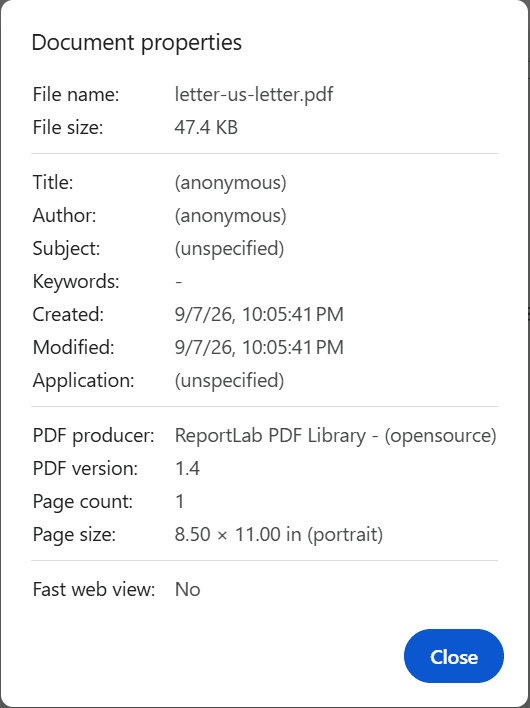
On a computer using Chrome, open the downloaded PDF in the browser. In the PDF viewer’s three-dot menu at the top right, choose Document properties. Look for Page size and Page count. Our downloaded file showed 8.50 × 11.00 in (portrait) and 1 page.
Using Adobe Acrobat or Reader instead? Its PDF viewing preferences (opens in new tab) include Page Display → Always Show Document Page Size. Browser zoom is not a paper-size measurement.
Check all pages if you have combined the letter with other documents. A Letter-size first page does not tell you the size of an attached receipt or form.
Changing the viewer's zoom does not change the PDF. Selecting Letter paper in a print dialog also does not, by itself, replace the file you downloaded. If you create a new PDF through a print or export action, open and inspect that new file.
Step 3: Fix an A4 file without losing the letter#
To keep the existing layout, try fitting the PDF when Postmarkr offers it after upload. To keep the original text size, change the source to Letter and export again. Exporting again can change line breaks and page count; fitting makes the existing content smaller.
Use Postmarkr's fitting option when offered#
In Postmarkr, start a letter and open Upload. Upload the existing A4 PDF. If it shows Fit your PDF to US Letter, choose Fit and preview. If the fitted preview loads, inspect the pages before accepting the fitted file. The mailing steps below explain what to check next.
Fitting scales and centers the existing pages without cropping. The page count and order stay the same, and the original file on your device stays unchanged. White margins can remain, and the text becomes smaller. Give small print and signature images a closer look.
If Postmarkr asks you to choose another PDF, return to the source document and export it as Letter. The fitting option cannot safely handle every PDF.

Open the full A4 upload screen (opens in new tab) to see the fitting explanation.
If the fitted preview takes too long: in our test, Postmarkr offered Continue to final printer proof after the preview timed out. That button is a way to proceed, not confirmation that the pages look right. Check the final printer proof before paying. If you cannot inspect it, choose another file or regenerate the PDF on Letter paper instead.
Regenerate the PDF on Letter paper#
If you can still edit the source, ask ChatGPT:
Regenerate the downloadable PDF on US Letter pages, 8.5 × 11 inches. Preserve the wording and 12-point text. Reflow the layout onto the new page size instead of shrinking an image of the existing pages.
For a Word or Google Docs source, change the paper size there and export again. Text can wrap differently, and the final paragraph or signature may move to another page. Read the new PDF, including the last page, before replacing your earlier upload.
Check that the wording survived, too. In our fictional example, the sentence to preserve is: “Please email the update to alex.morgan@example.com.” A correct page size would not make a changed email address correct.
Optional: compare the example files#
We made a fictional bicycle-repair follow-up to show what changes when a document is fitted or laid out again. All three PDFs have one page and contain the same letter text.
Example download | What to look for |
|---|---|
8.5 × 11 inches, with the letter laid out at 12 points. | |
Letter-size pages that preserve the A4 layout at a smaller scale. | |
The deliberately wrong-size original: approximately 8.27 × 11.69 inches, with 12-point text. Use it to compare, not as your mailing file. |
In this example, fitting scaled the A4 page to about 93%, making its 12-point text appear about 11.2 points. Open the full-size page comparison (opens in new tab) to inspect the line breaks and layout.
These are constructed examples. The fitted file was produced with Postmarkr's local PDF-fitting code; the files are not captured ChatGPT exports or a completed mailing test.
Use the plain-text example (opens in new tab) to try your own export. It contains fictional details for illustration; replace them before using it for a real letter. The Markdown copy (opens in new tab) is an editable source, without a mailing page size.
Step 4: Upload the file and send it with Postmarkr#
Sign in or create an account, then start a letter in Postmarkr. In Upload, upload the PDF you have just checked and select your print options. Letter uploads must be PDF files, no larger than 5 MB and no more than 50 pages. A password-protected or encrypted PDF needs an unprotected copy before it can be processed.
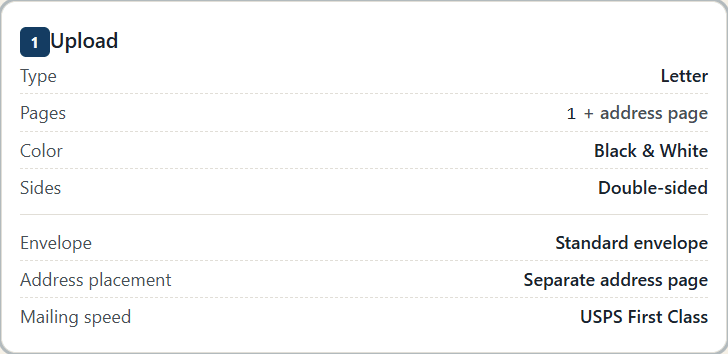
Open the full Upload screen (opens in new tab) to see the uploaded document confirmation, Remove button, print options and Continue to addresses.
Choose Continue to addresses. In Addresses, enter or select the recipient and return addresses. Check the apartment or suite number and the recipient's name against your own source.
The address written inside your letter does not replace these mailing fields. If you correct an address in ChatGPT and download a new PDF, check the mailing address in Postmarkr separately.
Choose Continue to review. In Review, inspect the final print preview. Postmarkr adds a separate address page for letters, so a one-page uploaded letter can appear with an additional page in the mailing preview. That is different from accidentally exporting a blank second page from your editor.
In our test, the one-page ChatGPT letter became a two-page printer proof: the address page first, then the letter. On Postmarkr’s Review screen, those thumbnails are labeled Address page and Page 1. “Page 1” here means the first page of your letter, not the first page of the combined PDF.
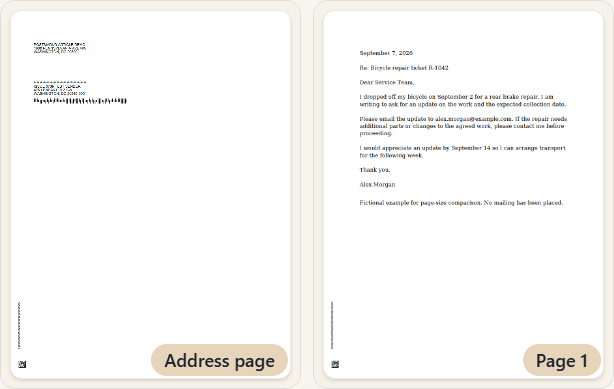
Use Download PDF Preview on the Review screen to open the mailing proof. Check the letter page as well as the address page. If the screen has not finished preparing the proof, wait for it; an upload confirmation is not the final check.
Open our revised example’s printer proof (opens in new tab) to see both pages. It uses demo names and public-institution test addresses; use your own addresses for a real letter. The screens and proof were captured September 8, 2026, before payment. No mailing was placed.
Look at the full price with your selected print options before proceeding to payment. If a rewrite has added a content page, review the total again. A PDF page and a physical sheet are different things when printing on both sides.
The fitting preview helps you inspect resized content. The final mailing preview is where you check that content together with the mailing setup. Recheck it after changing the document, addresses or print options.
If you edit the letter after uploading it#
Changing the text in ChatGPT does not update a saved PDF or the copy already uploaded to Postmarkr. Download the new PDF, then return to Upload, remove the earlier upload and upload the revised file. Wait for the new mailing preview and check the changed sentence there before paying.
A filename such as letter-us-letter-v2.pdf helps distinguish it from the earlier version. We tested a small change: asking ChatGPT to move our example’s requested update date from September 11 to September 14. The revised ChatGPT download (opens in new tab) remained one US Letter page, with only that date changed in the extracted text.
After removing the earlier upload and uploading the revised PDF, we downloaded a new Postmarkr proof. It contained September 14, no longer contained September 11, and matched the revised letter’s text. Both proof pages were US Letter.
Open the full letter-preview screenshot (opens in new tab) for context, or compare the original September 11 proof (opens in new tab) with the revised September 14 proof (opens in new tab).
Do that same check for your own edit: find the changed sentence in the new mailing proof, rather than relying on the upload confirmation or filename. If the new proof will not load, pause and resolve that before paying.
Before you send: check these easy-to-miss details#
Every referenced attachment is included. “I have enclosed the receipt” does not add the receipt to your PDF. Include the intended pages in the document you upload, check their order and size, or remove the sentence if you are not enclosing anything.
The last page earns its place. Check for a sign-off pushed onto its own page, an accidental blank page, or commentary such as “Here is your revised letter.” Fix unwanted content in the source rather than shrinking the entire letter to make it fit.
Names and signatures remain readable. Inspect accented characters, symbols and any signature image. Putting a blurry screenshot inside a PDF does not restore its detail. A text-based PDF usually avoids the need to turn your letter into an image in the first place.
You can mail a printed copy. If you need to sign the paper in ink or include a physical item, use the guide to printing without your own printer to get the pages into your hands.
Keep the final PDF you approved. Creating or downloading the file in ChatGPT does not place the mailing order; complete payment in Postmarkr when you are ready to send.
Sources and testing notes#
The PDF export instructions and Windows Chrome captures were checked September 7, 2026. We measured the signed-in ChatGPT export and uploaded it to Postmarkr. Original and revised printer proofs were downloaded and checked September 8, 2026. Both have two US Letter pages; each letter page matches its corresponding ChatGPT file. The screenshots show a test before payment; no physical mailing was placed. The A4 comparison files are constructed examples, as labeled above. Browser-assistant guidance was checked October 20, 2026; ChatGPT dots and Meta Muse have not been tested on Postmarkr.