To mail a paper invoice, print it on plain paper with your remit-to address (where payments go), invoice number, due date and a way to pay. Place both addresses so they show through the windows of a #10 double-window envelope, fold the page in thirds with the addresses facing out, and put on postage for its weight: one $0.82 stamp covers about four sheets with the envelope. Then mail it early enough for the due date, and note the day it went out.
You probably email most of your invoices. This guide is for sending an invoice by mail to the customers who still want paper: the client who pays by check, the accounts-payable office that asks for mail, the account where an email went unanswered. If you're still deciding whether a customer should get paper at all, start with our comparison of mailed and emailed invoices. And if you'd rather not line anything up, the envelope section below also covers handing the PDF to a print-and-mail service.
You'll need a printer and plain letter-size paper, #10 double-window envelopes, stamps, a scale if the envelope is close to an ounce, and reply envelopes if you decide to include them.
What a mailed invoice needs on the page#
This isn't a full list of what belongs on an invoice. It's the parts that matter because this one travels by mail, and may be paid by a check that comes back the same way.
- A remit-to address. This is where payments go, and it can differ from your return address: a PO box or a bank lockbox, for example. Label it plainly, such as "Mail payments to," so a check doesn't land at the wrong office.
- Your return address and your customer's mailing address, placed where the envelope's windows will show them. The envelope section below shows where.
- The invoice number, with a line asking the customer to write it on the check.
- The invoice date and a due date written as a date, such as "Due November 14," not only "Net 30." On paper, there's no reminder for your customer to click.
- The amount due, in one place that's easy to find.
- How to pay: the name checks should be made out to and, if you take online payments, a pay link printed both as a short web address and as a QR code.
- A phone number or email address for questions.
If you add a QR code, print one copy and scan it with your phone before you print a batch. It should open the right payment page.
Print it on plain letter paper#
Use standard letter-size printer paper in white. USPS requires the address that shows through a window, and any barcode with it, to be printed on white paper or paper of a very light color. So keep tinted backgrounds, watermarks and patterns away from both address blocks.
Print at actual size (100%), not "fit to page," because scaling moves the address blocks away from where you placed them. Print the addresses in black.
If a long invoice runs past four sheets, printing on both sides can keep it to one stamp.
Some invoicing tools don't let you move the address block. If yours won't, or you don't have window envelopes on hand, fold the invoice into a plain #10 envelope and address the envelope instead (our guide to addressing an envelope covers the layout), or skip the window layout with the service option in the next section.
Where the addresses go in a double-window envelope#
A #10 double-window envelope has two windows on its front and a corner for the stamp. The diagram shows the front of the envelope and the whole invoice page with its fold lines; the list below says the same thing in words.
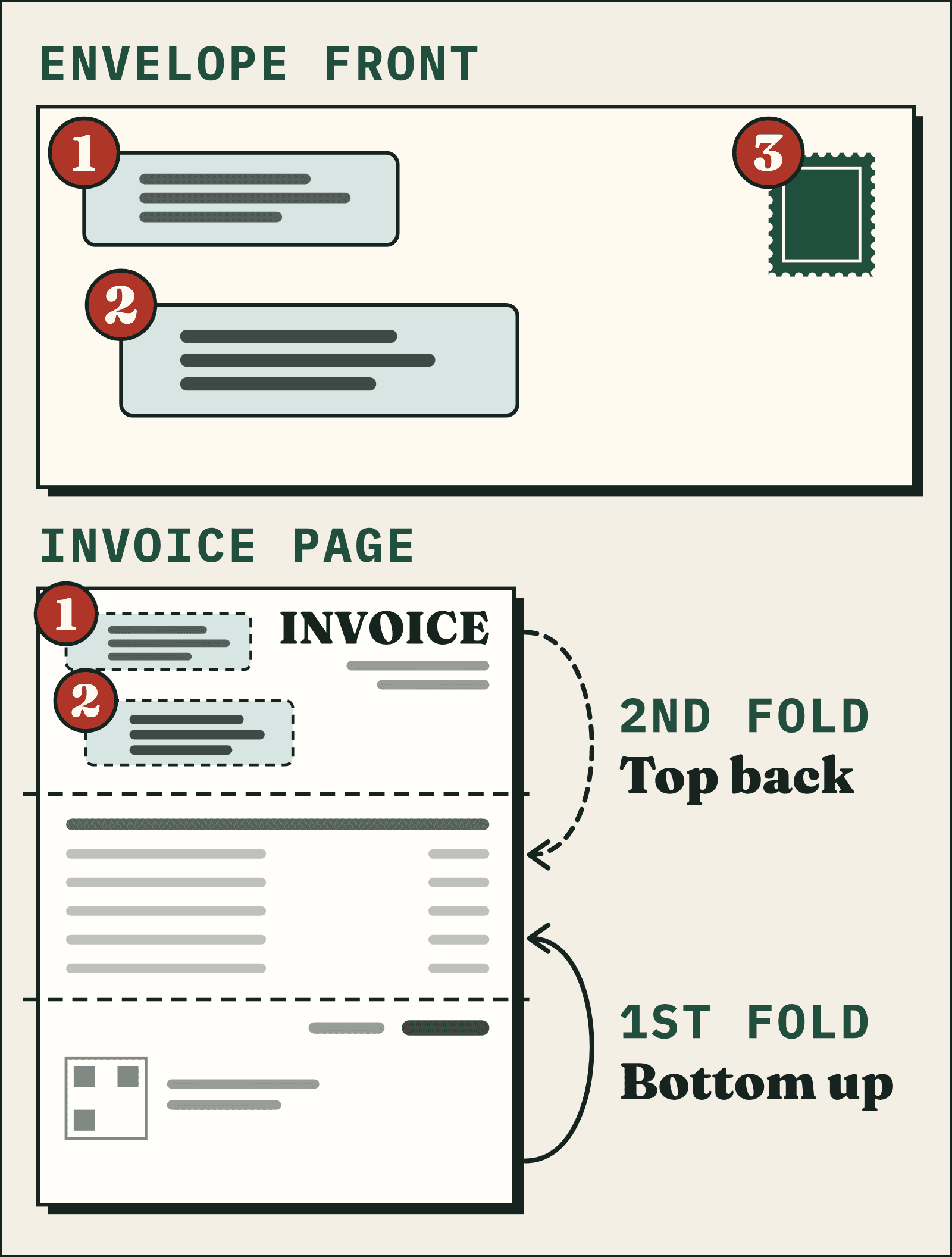
- Your return address sits near the top left of the invoice, behind the envelope's upper window. Use an address someone checks, because undeliverable mail comes back there.
- Your customer's mailing address sits below it, behind the lower window.
- The stamp goes on the envelope itself, in the upper-right corner.
- Everything else on the page stays out of both windows: the amount due, account numbers and any notes.
- The fold lines divide the page into thirds, with both addresses in the top third. The bottom third folds up and the top third folds back; the next section has the steps.
USPS's rule for window envelopes is about movement. Every character of your customer's address has to stay completely visible through the window however far the invoice slides inside the envelope. USPS also requires at least 1/8 inch of clear space between that address block and every edge of its window, even with the sheet pushed as far as it goes in each direction. Check your return address the same way, so it stays readable too.
Window positions vary from one envelope box to the next, so set up your invoice template from the layout guide or measurements printed on the box or the maker's product page. Then test it: print one page on plain paper, fold it as described below and slide it into an envelope. Both addresses should show in full, and nothing else on the page, such as the amount due, should show in either window. The windows don't add to your postage: USPS says windows in a paper envelope don't make a letter nonmachinable.
Or skip the alignment altogether. With Postmarkr, you upload the invoice PDF as it is and add your customer's address. Postmarkr prints a separate address page with both addresses on it, and that page, not your invoice, sits behind the windows of a #10 double-window envelope with a security tint inside (very long invoices travel flat in a larger envelope). Your invoice follows it unchanged, layout and all. A one-page invoice in black and white costs $2.05, including printing, the envelope, the address page, First-Class postage and the processing fee. A stamp costs less in cash; the difference pays for the printing, folding, stuffing and stamping. The address is checked against USPS data before you pay, and the letter is printed the next business day after payment. A Postmarkr letter carries no reply envelope or tear-off stub, so keep your remit-to address and payment instructions on the invoice. Longer invoices cost a little more; see invoice mailing totals by page count.
Fold it in thirds so the addresses face out#
Lay the invoice face up with the addresses at the top. For a two- or three-page invoice, stack the pages in order with page one on top and fold them together as one.
- Fold the bottom third up over the middle of the page.
- Fold the top third back, behind the middle, so the address panel faces out. From the side, the page now looks like a Z.
- Slide it into the envelope with the address panel toward the windows and the addresses right side up.
Then do a tap test on one sealed sample. Tap the envelope on a table on each of its four edges, and look at the windows after each tap. Your customer's address should stay fully in view with clear space all around it, which is USPS's movement rule in practice. Your return address should stay readable too. If either one slips behind the edge of a window, move that address block in your template rather than changing the fold.
If an invoice is too thick to fold neatly, print it on both sides. If it's still too thick, it belongs in a large flat envelope instead; the size guide linked in the next section covers that choice.
Postage: one stamp covers about four sheets#
One stamp, $0.82, covers a First-Class letter up to 1 ounce. USPS's rule of thumb is that four sheets of printer paper in a business-size envelope weigh about that much. A reply envelope, heavier paper or a fifth sheet can push the envelope over, so if you're near four sheets, weigh one finished envelope before you stamp the batch.
Up to 2 ounces costs $1.11. You don't need a stamp in that amount: any combination of stamps that adds up to the postage works. Our guide to how much it costs to mail a letter covers stamp counts by weight.
Past 3.5 ounces, a letter pays large-envelope (flat) prices. The First-Class Mail size guide covers how many pages fit in a #10 and when a long invoice should go flat.
Invoices go by First-Class Mail. USPS doesn't accept bills or statements of account at Marketing Mail prices, apart from a few narrow exceptions.
Metered postage for the same 1-ounce letter is $0.78. Whether a meter or an online postage account pays off at your monthly volume is covered in postage options for mailing invoices.
Add a reply envelope, or print a pay link instead#
For most invoices, the remit-to address and any pay link on the page are enough, and customers who pay by check use their own envelope and stamp. Add a reply envelope when several of your customers pay by check and you want to make that as easy as possible.
Reply envelope options
Option | What it costs you | Best when |
|---|---|---|
No reply envelope | Nothing | Customers pay online or use their own envelope |
Reply envelope the customer stamps | The envelopes; your customer adds a $0.82 stamp | Several customers pay by check |
USPS Business Reply Mail | A $390.00 annual permit, plus postage and a fee on each envelope returned | A long list of check payers |
A reply envelope has to fit inside your #10 without folding. Put it behind the folded invoice, on the side away from the windows, so only the invoice shows through them, and include it in your tap test. It also counts toward the ounce, so weigh one with the invoice. Print your remit-to address on it, or buy envelopes pre-printed.
A remittance slip at the bottom of the invoice works without any reply envelope: the customer cuts it off and sends it with the check. Write "cut along the line" rather than "tear off" unless your paper is perforated.
When to mail it: count back from the due date#
Paper adds two trips to a payment: your invoice going out and, for customers who pay by check, the check coming back. Plan for both.
- Drop the invoice in a collection box or at the Post Office before the last pickup time posted there. Anything dropped after that waits until the next postal business day.
- USPS estimates 1–5 days for First-Class delivery.
- First-Class letters aren't eligible for USPS Tracking, so you won't see when it arrives. Set the dates up front instead of watching for delivery.
- A check mailed back to you makes the same First-Class trip.
Here's a worked example. Say you want a check in hand by the 30th.
- Allow up to 5 days for the invoice to reach your customer.
- Allow about 5 days for your customer to pay. That's our assumption, not a USPS figure; use what you know about the customer.
- Allow up to 5 days for the check to reach you.
So mail it by about the 15th, before that day's last pickup. Print a due date of about the 25th, so a check mailed on the due date should still arrive by about the 30th. That's a cushion we suggest, not a USPS standard; a customer who pays online cuts out the third step.
If you need proof that a particular invoice went out, ask for a Certificate of Mailing at the Post Office counter when you mail it: $2.45 for one piece. You can only get one at the time of mailing; our guide to proof of mailing at the counter covers the visit. USPS says postmarking isn't a proof-of-mailing service. For a record of delivery, look at Certified Mail: it comes with a mailing receipt and, if you ask for it, electronic verification of delivery or attempted delivery.
Keep a record, and what to do if it comes back#
On the day you mail it:
- Mark the invoice as sent in your accounting software, so its status matches what you mailed.
- Keep the PDF you printed, the address you used and the date it went out.
If it comes back, USPS returns undeliverable First-Class Mail to your return address at no charge. If your customer filed a change of address, USPS forwards the invoice at no charge for the first 12 months after the move. For the six months after that, it comes back to you with the new address attached. Whenever an invoice comes back, confirm the address with your customer, update your records, mail it again and note both dates.